Database patterns
Working with D1 databases on Cloudflare Workers
Understanding the connection model
Cloudflare Workers use a fundamentally different approach to database connections than traditional Next.js deployments. There are no persistent connections or connection pools. Instead, each request receives a fresh connection via a binding, which automatically closes when the request completes.
This means you cannot create a global database client. You must create a new client for each request, and any adapter that attempts to reuse connections will fail.
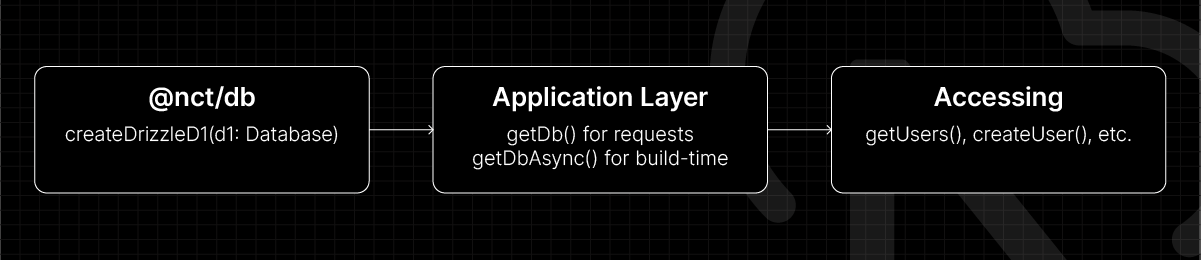
This works in three simple steps:
The database package
The @nct/db package provides a connection factory that creates Drizzle clients for D1:
import type { D1Database } from "@cloudflare/workers-types"
import { drizzle } from "drizzle-orm/d1"

export * from "./schema/posts.sql"
export * from "./schema/users.sql"
export * from "./types/posts.types"
export * from "./types/users.types"

import { posts } from "./schema/posts.sql"
import { users } from "./schema/users.sql"

export const schema = {
  users,
  posts,
} as const

// Connection factory - called per request
export function createDrizzleD1(d1: D1Database) {
  return drizzle(d1, { schema })
}

export type Database = ReturnType<typeof createDrizzleD1>
The createDrizzleD1() function is called fresh for each request, ensuring no connection reuse.
Request-time vs build-time access
The application layer wraps the connection factory with context-aware helpers:
// Example code: https://opennext.js.org/cloudflare/howtos/db#d1-example

import { cache } from "react"

import { createDrizzleD1 } from "@nct/db"
import { getCloudflareContext } from "@opennextjs/cloudflare"

export const getDb = cache(() => {
  const { env } = getCloudflareContext()
  return createDrizzleD1(env.DB)
})

// For static routes (i.e. ISR/SSG)
export const getDbAsync = cache(async () => {
  const { env } = await getCloudflareContext({ async: true })
  return createDrizzleD1(env.DB)
})
These functions handle the key distinction in Cloudflare Workers deployments:
getDb()is for live requests in Server Components. When a user hits your application, the Cloudflare context is immediately available synchronously.getDbAsync()is for build-time operations like static generation and ISR. During builds, there's no incoming request, so the context must be accessed asynchronously.
Both functions use React's cache() to prevent duplicate database calls within a single render.
Accessing environment bindings
The getCloudflareContext() pattern differs from traditional Next.js deployments where you may use process.env:
// Cloudflare Workers
const { env } = getCloudflareContext()
const db = createDrizzleD1(env.DB) // from @nct/db

// vs Traditional (won't work in Workers)
const db = createClient(process.env.DATABASE_URL)
Workers don't have process.env. Instead, bindings are defined in wrangler.jsonc and accessed through the Cloudflare context:
  "d1_databases": [
    {
      "binding": "DB",
      "database_name": "next-cloudflare-turbo",
      "database_id": "04bb2f8f-076a-4e72-8baf-c4b533ad3ef8",
      "migrations_dir": "../../packages/db/drizzle/migrations"
    }
  ]
The binding property determines the environment key. A binding named DB is accessed as env.DB. You could name this anything you want. If it were CF_DATABASE, the accessor would be env.CF_DATABASE.
Organising the data layer
Queries and Actions are kept separately for a clear divide between read and write operations. Queries use React's cache() for deduplication, and Actions utilise the "use server" directive.
Exporting queries and actions through the index.ts file allows for cleaner imports:
import { getUsers, createUser } from "@/data/users"
Query patterns and examples
Queries follow standard Drizzle patterns, with the database client obtained from the appropriate helper:
Read Operations (Queries)
import { getDbAsync } from "@/lib/db"
import { users } from "@nct/db/schema"

export async function getUsers() {
  const db = await getDbAsync()
  return await db.select().from(users)
}
Write Operations (Mutations)
"use server"

import { getDbAsync } from "@/lib/db"
import { users } from "@nct/db/schema"

export async function createUser(data: NewUser) {
  const db = await getDbAsync()
  return await db.insert(users).values(data).returning()
}
The actual query syntax is identical to standard Drizzle. The only difference is how you obtain the database client.
FAQ
How is this guide?
Last updated on